Inventory andproject trackingfor integrators.

Track items on any device, cut inventory leakage, and stop entering data twice. Tracknicity syncs your Items, Clients, Projects and Purchase Orders with QuickBooks and D-Tools.

Free onboarding support for a limited time.

Tracknicity mobile app showing an in-ceiling speaker with quantity, cost, price, UPC and its recent transaction history

Scan it. Check it out. It's on the job.

Your crew works from the warehouse shelf, the van and the job site. Every move is recorded where it happens.

  • ScanPoint the phone at a UPC. No label printers, no searching.
  • Check outMove stock from the warehouse to a van or a project in one transaction.
  • SyncPurchase orders and inventory data flow to QuickBooks or D-Tools automatically.
Try it: transactionSample data

Cisco: SG110-16HP

Cost $143.91 · Warehouse

Qty4
882658722707
Ready. Scan the item to begin.

History

  • Cisco: SG110-16HPWarehouse to Van 151
  • Cisco: SG110-16HPVan 2 to Van 151

The demo uses sample items from the Tracknicity mobile app.
Everything the crew
and the office need.

Get the app

Mobile appSample data
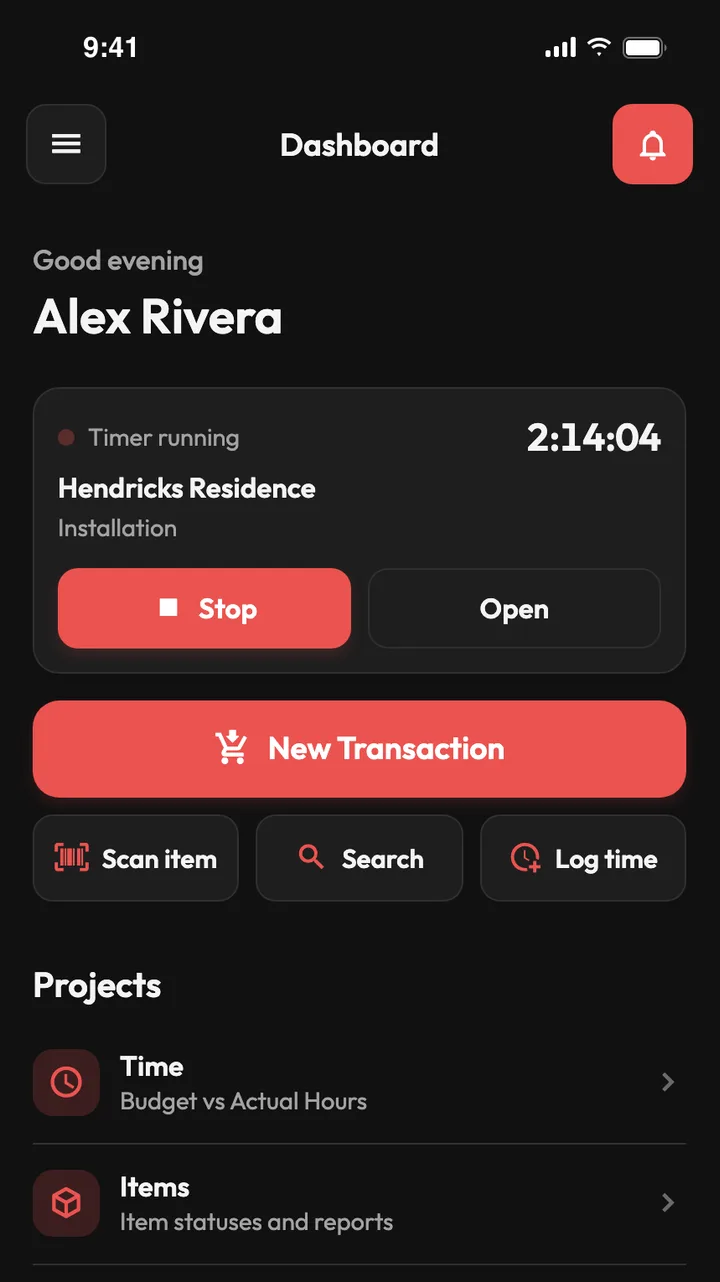
Tracknicity mobile dashboard with a running job timer above New Transaction, Scan item, Search and Log time buttons and project shortcuts.
  • Check out stock to a job, van or staging area.
  • Request parts and receive deliveries in the same app.
  • Search by manufacturer, model, part number or UPC.

Web dashboardSample data
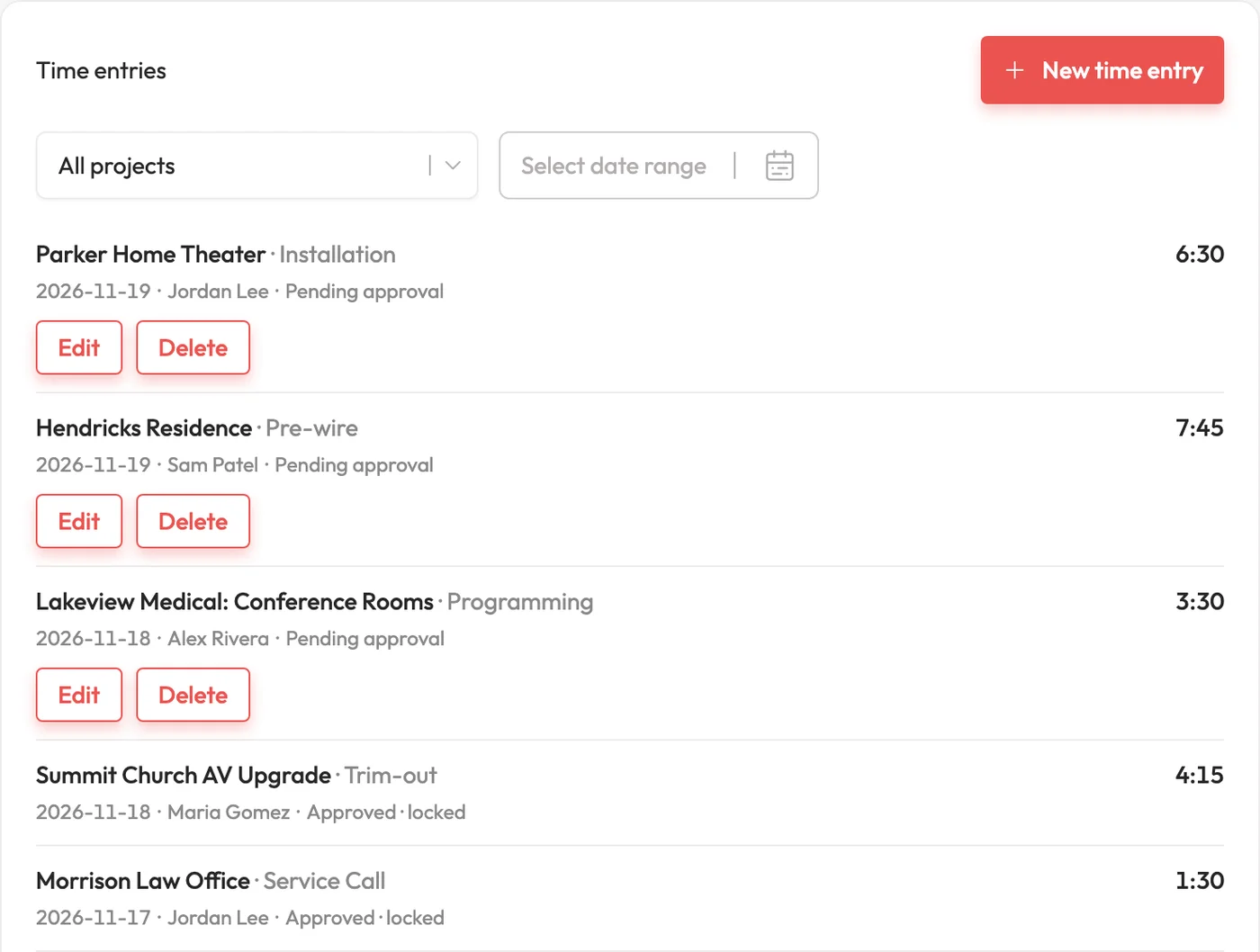
Time entries list showing project, service, technician, hours and Pending approval or Approved status for each entry.
  • Log time against a project and service item.
  • Managers approve entries before they count.
  • Approved time syncs back to D-Tools and QuickBooks Desktop, so nobody re-enters hours.

Web dashboardSample data
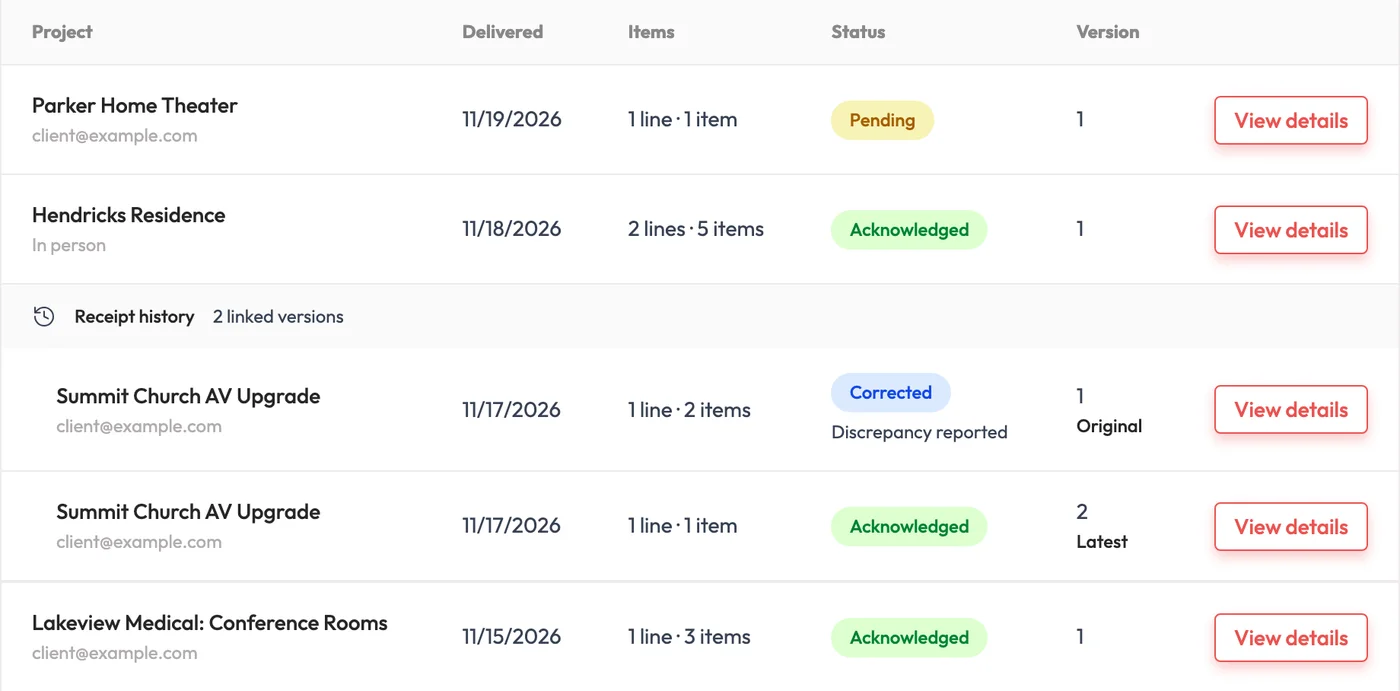
Delivery receipts list with Pending and Acknowledged receipts, and a corrected receipt marked Discrepancy reported next to its latest version.
  • Customers can report a discrepancy on any receipt.
  • Correct a delivery and send a new receipt. The original and its history stay on file.
  • Receipt emails and PDFs carry your logo and brand color.

Mobile appSample data
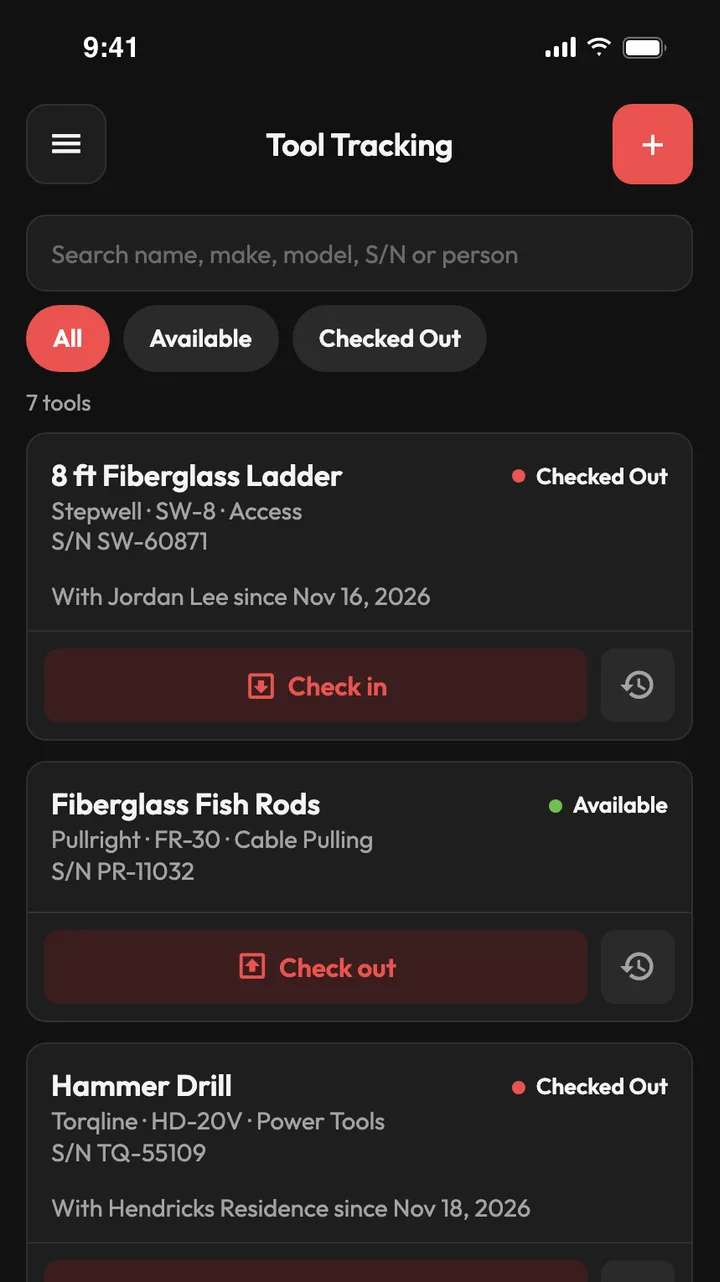
Mobile Tool Tracking screen listing a ladder and a hammer drill as Checked Out and fish rods as Available, with Check in and Check out buttons.
  • See each tool's status and history on web or mobile.
  • Search by name, make, model, serial number or person.
  • Add notes and report quality issues so tools stay in good shape.

Web dashboardSample data
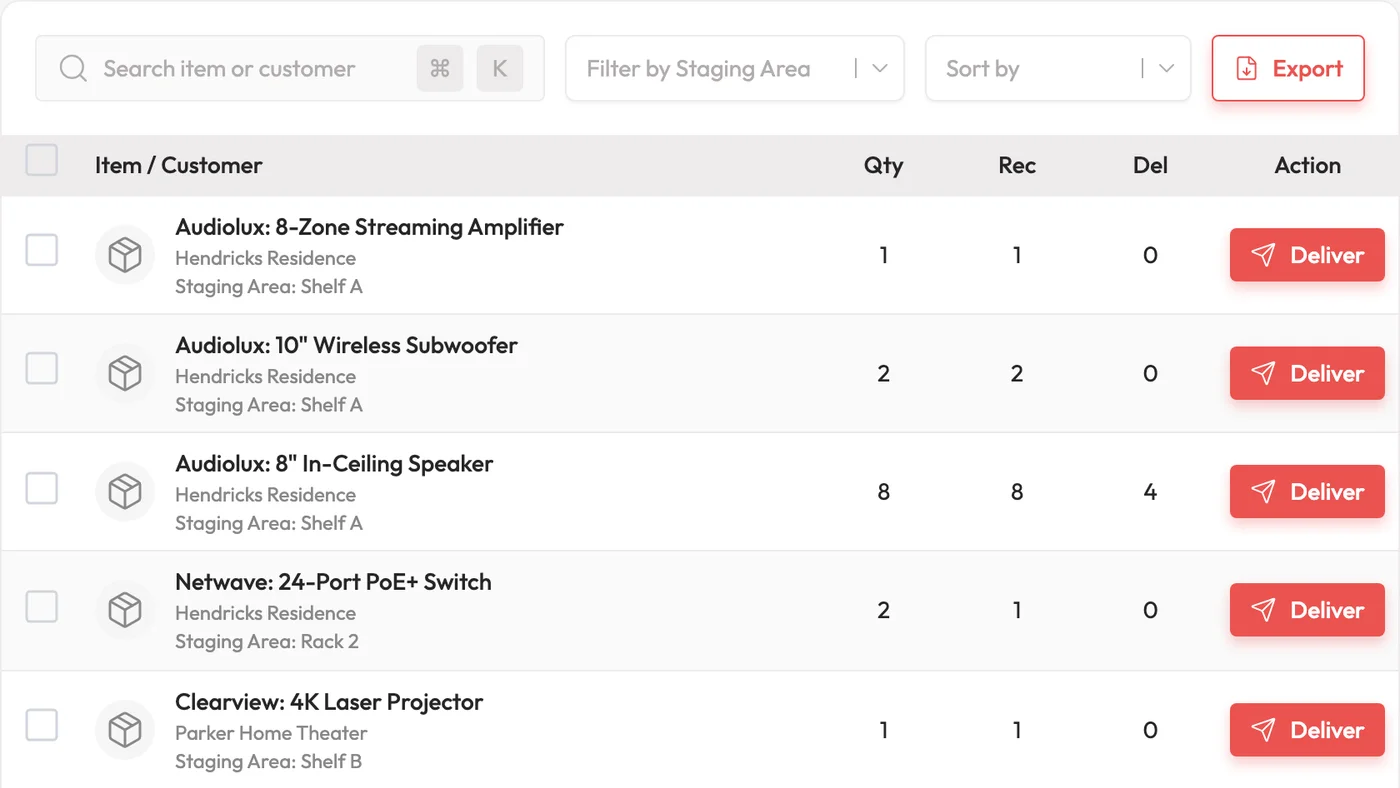
Staging area report listing staged items by project and shelf, each with a Deliver button.
  • Create multiple staging areas for one project.
  • Move staged items between areas.
  • Filter by staging area and export the list.

Web dashboardSample data
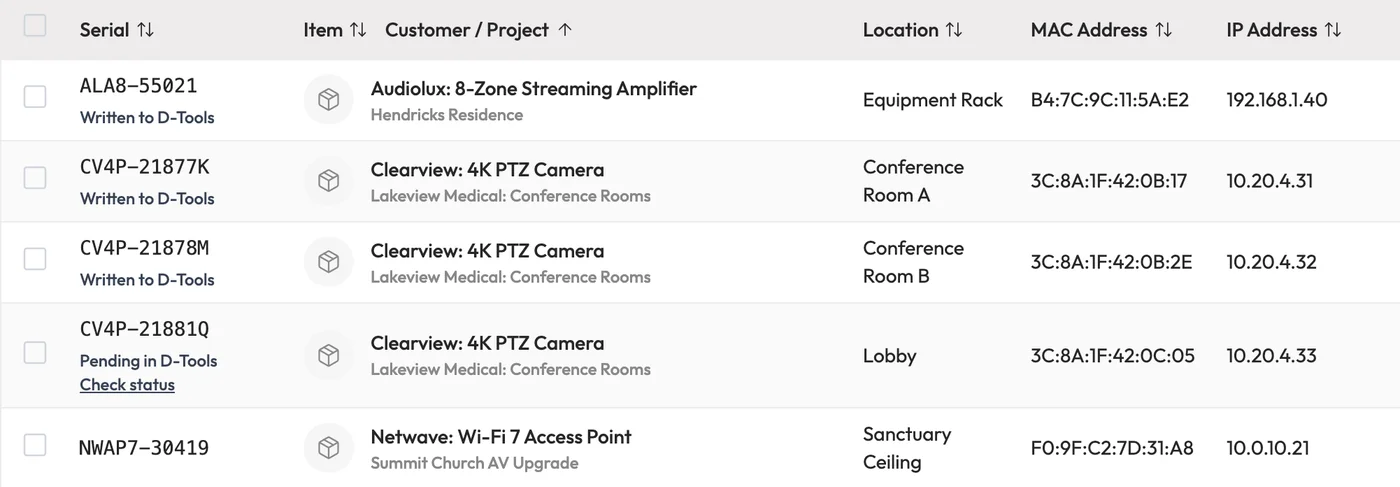
Serial number lookup showing serials with their item, project, install location, MAC and IP address, and D-Tools sync status.
  • See the item, project and location behind every serial.
  • Check each serial's import status on the web.

Web dashboardSample data
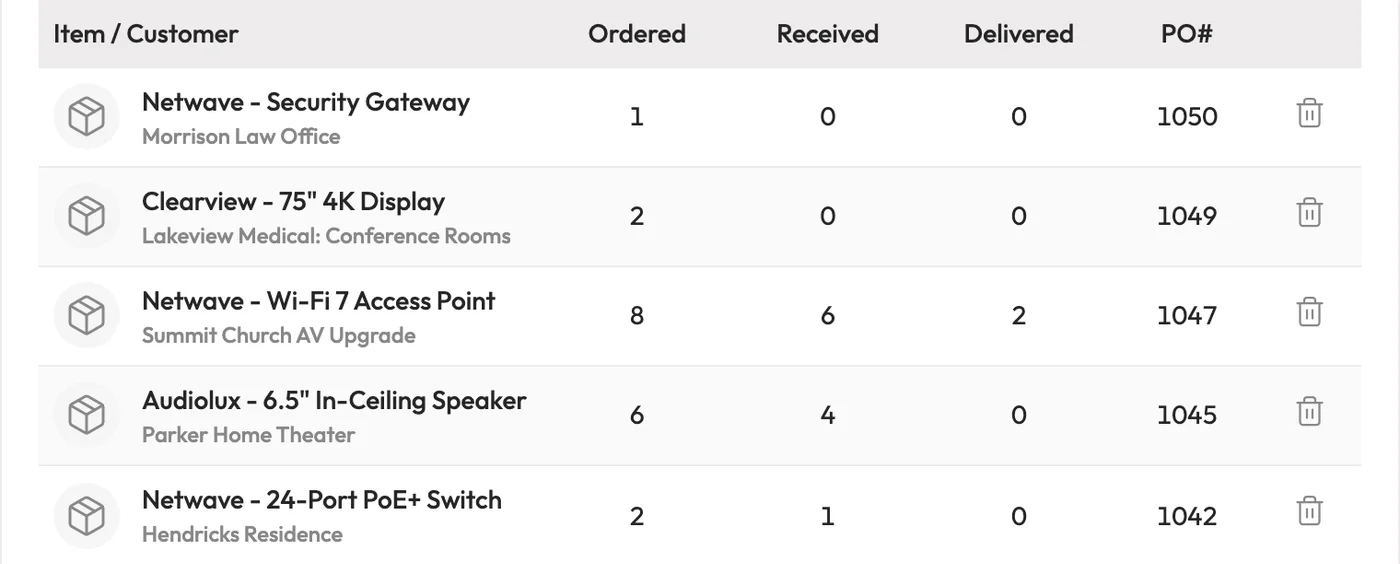
Purchase order report showing ordered, received and delivered quantities for each item and project.
  • Track ordered, received and delivered counts on every line.
  • Items, Clients, Projects and Purchase Orders sync, so nothing is entered twice.

Web dashboardSample data
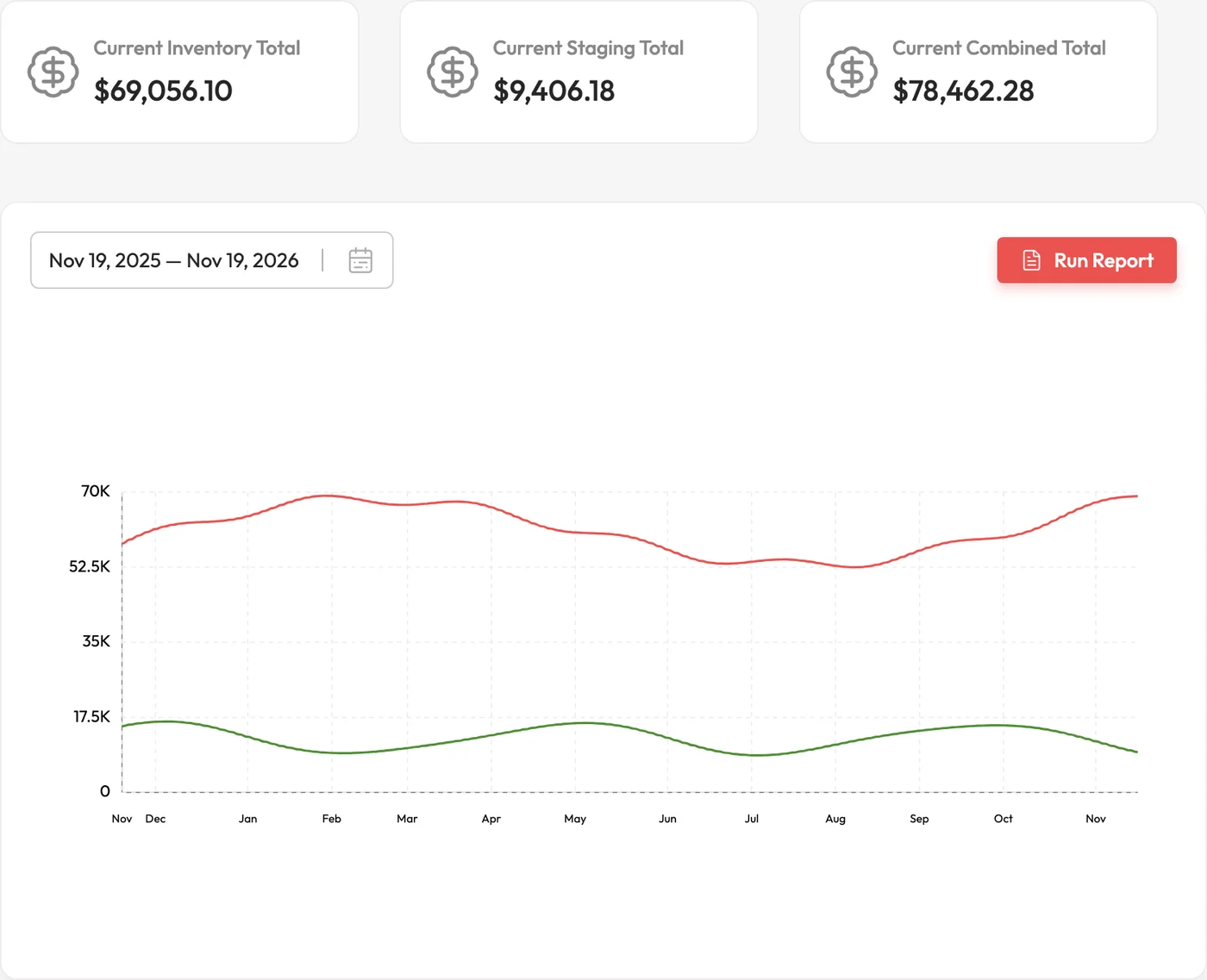
Total valuation report with inventory, staging and combined totals above a chart of value over the past year.
  • Inventory, staging and combined value over any date range.
  • Project and purchase order reports in a click.

Screens show sample projects from the Tracknicity demo company. Everything syncs through the cloud, and push notifications alert the right people to requests and deliveries.

Syncs with the books you already keep.

Tracknicity pulls your Items, Clients, Projects and Purchase Orders so nothing is entered twice.

QuickBooks

QuickBooks Desktop

Connect to your QuickBooks Desktop software to automatically sync accurate inventory tracking data for job costing and invoicing.

How it works with Desktop
QuickBooks

QuickBooks Online

Connect your QuickBooks Online company in a few clicks. Items, customers, estimates and purchase orders stay in sync as they change.

How it works with Online
D-Tools System Integration Software

D-Tools

Bring your D-Tools projects, items and purchase orders into Tracknicity and keep stock accurate for every job.

D-Tools partnership

Compared to previous inventory systems we've had, the biggest things we like about Tracknicity are the simplicity, the flexibility, and the support.

There's really something to be said about an inventory system that's built from the ground up for integrators/small companies in the construction industry. We've struggled with the rigidity of other inventory systems where you're forced to fit inside their pre-determined box.

Time savings using Tracknicity has been huge as well. No printers, scanners, etc… it's all done on the app. No creating labels. Nothing. Adding items to inventory or a new item is an absolute piece of cake. On the support side, the Tracknicity team has been VERY responsive to our questions and customization requests. Usually same day responses if not faster which has made our implementation much easier and has given us a lot of confidence in it.

Purchasing Manager, Tracknicity client, Colorado

Save time and money by simplifying your business.

  • Improve accuracy of your inventory
  • Check stock of an item before you place a purchase order
  • Simplify complex tasks
  • Eliminate the need to enter data more than once
  • Generate detailed inventory and project reports

14-day free trial

$199/mo
or yearly$2,189/yr · save $199
  • Unlimited inventory items
  • Unlimited projects
  • Unlimited cloud storage
  • Mobile app
  • Mobile push notifications
  • Unlimited customer support
Start your free trial

Try every feature free for 14 days. Free onboarding support for a limited time.

Put every item on the job.

Empower employees, manage multi-location inventory, cut leakage, and improve communication. Download Tracknicity from the iOS App Store or Google Play.